
Install and enter the right service
Match the current client to your region and storefront before following setup advice.
Prepare your first session, choose a class and explore character creation. Use the beginner guide for service-specific dungeon reward checks.
Start with your service and account, then jump to the relevant checks.
Match the current client to your region and storefront before following setup advice.
Founder items and Twitch rewards follow different entitlement and linking rules.
Find the documented exit and separate entry requirements from reward blockers.
Read transfer eligibility, storage and slot checks; then compare your symptom with current notices.
Official media · AION2 公式チャンネル
The official site introduces four-player expeditions including Urugugu Canyon, Fire Temple and Draupnir. These publisher previews establish setting and presentation, not a complete boss strategy.
Watch on YouTubeThe player connects to YouTube only when you press play. If playback is unavailable here, open the original video.

AION 2 information is published by service and platform. Begin with the live official route for the client you plan to use, then use clearly labelled player material for practical context.
Open official guidebook ↗Use the live official source for your client and region before you plan a download, access date, or feature.
→02The Korean official Guidebook lists nine classes; the global showcase displays eight. Compare their published roles before relying on a tier list.
→03Controller support is documented as a Korea-service beta topic, so check the active service guide before applying a layout.
→The Korean Guidebook separates PC controls, mobile controls, and controller-support beta material. It is the right place to confirm a service-specific input or platform question before changing settings or following a walkthrough.
Watch on YouTubeThe player connects to YouTube only when you press play. If playback is unavailable here, open the original video.
The supplied video, “10 Things I Wish I Knew Before Starting AION 2,” shares one player’s hands-on setup habits. It is useful context for inventory, combat, and large-battle preparation, but it is not an official global guide.
Watch the supplied player guide ↗The creator recommends using quick selection and auto-extraction carefully, then locking gear, accessories, and other valuables before handling multiple items. Treat this as a player workflow to test in your own client.
The video suggests reviewing enemy targeting, combat-power visibility, and key placement before PvP. Its examples describe one player’s setup, not a published control standard.
For siege-scale scenes, the creator prioritizes readable targets and smoother performance over visual detail. Check the live service settings and test changes locally rather than copying a configuration blindly.
For global AION 2, check that Twitch is connected to the account you actually play: Steam for Steam players, NC (PURPLE) for PURPLE players. Claim earned rewards manually in Twitch Inventory. The announced claim deadline is October 30 at 23:59 PDT / October 31 at 07:59 CET. If rewards are missing, do not add a separate NC account link; check the official support guidance first.
Read guide →
AION 2 launched October 5. Founder cosmetics now have a dedicated free shop following the October 6/7 update. Prepare for server transfers from October 13/14, check the current issue notices and claim the launch code before its regional deadline.
Read guide →
Start with the AION 2 service and platform you intend to play, then choose a class and check its controls. If you are leveling in Taiwan, do not decide whether to claim dungeon rewards from level 45 alone: the service raised its level cap to 50 and changed dungeon limits on July 1, 2026. Compare the reward, Od Energy cost and remaining unclaimed-reward allowance before leaving.
Read guide →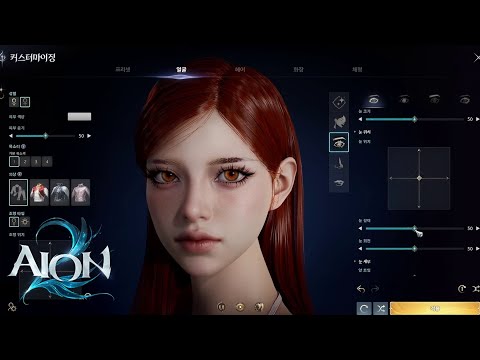
The official Steam description currently says AION 2 has over 200 customization options and mentions outfits, mounts, and wings. It does not publish a complete global character-creation walkthrough, preset list, or feature comparison by service.
Read guide →